Project Setup
If you want to take a look inside a project, there are currently three important repositories:
- VIRTUOS_Playground: The repository contains the Unreal Engine Project
- VIRTUOS_Assets: Contains all Project related assets like 3D-Models, Graphics etc.
- VIRTUOS_Documents: Contains all written Documents
- VIRTUOS_Docs: The Documentation of this Project (which you’re reading right now)
Setting up the project with UE5
If you’re familiar with Git, you’ll likely already know how to get the files from the repository:
git pull https://code.virtuos.world/VIRTUOS_WORLD/VIRTUOS_Docs.gitIf you’re not comforatable with the command line, you can install a Git GUI like Github Desktop:
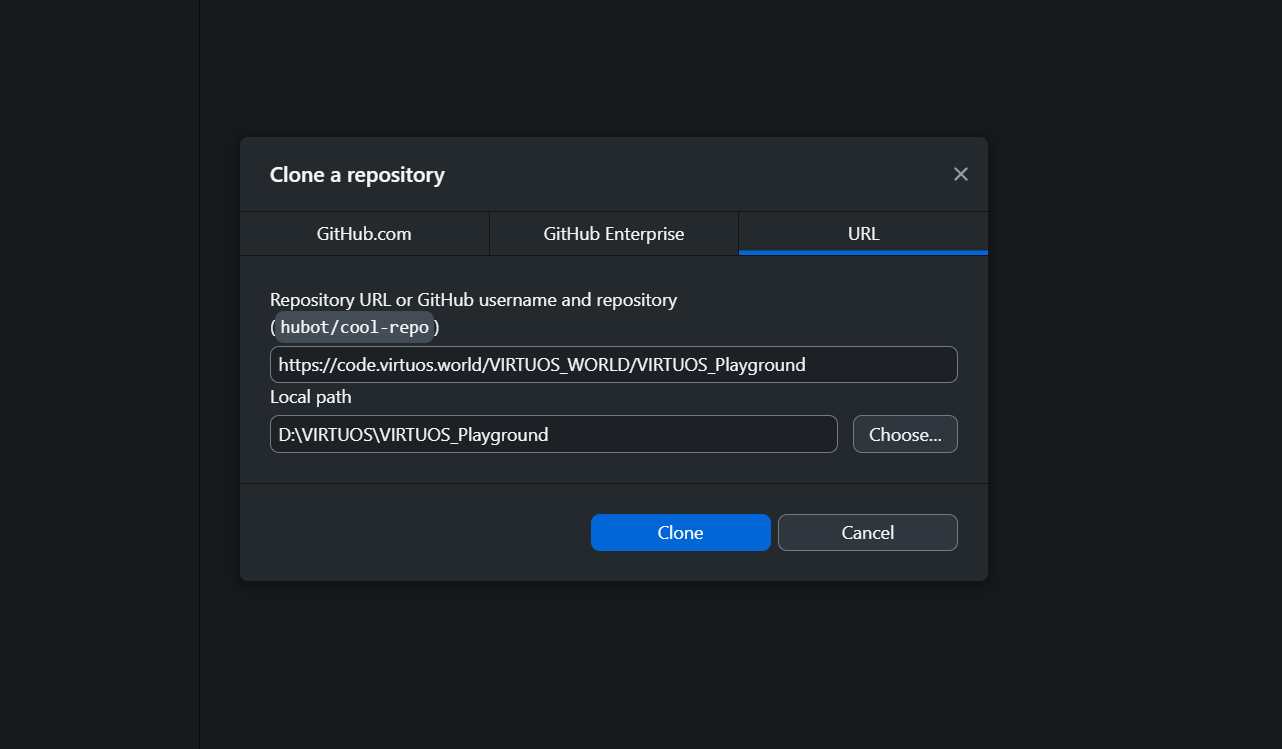
Hit File -> Clone repository

Enter the repository from code.virtuos.world you want to clone, e.g. https://code.virtuos.world/VIRTUOS_WORLD/VIRTUOS_Playground.git
Dependencies
The project uses the following external Plugins:
- VR Expansion Plugin
- SPUD: Steve’s Persistent Unreal Data library
- SUDS: Steve’s Unreal Dialogue System
- StevesUEHelpers: Steve’s UE Helper Plugin Library
The Plugins are already in the /Plugins folder and should build with the project without errors. For manual installation, see the respective Documentation.
Building the project
To build the project, you’ll need Visual Studio installed on your system.
-
Right click the .uproject file and hit
Generate Visual Studio project files. -
Open the newly generated .sln file in Visual Studio. From there, hit
Build -> Build solution.
Note: This may take a while.